Google's search systems and AI assistants now decide what your business is in the milliseconds before a results page loads, and plain text only gets you so far. In November 2026, schema markup, the JSON-LD code that states your name, services, and ratings in machine-readable form, is still one of the most under-used advantages in local marketing. This walkthrough from Purple Crib Studios shows you how to generate valid JSON-LD for your website free in about five minutes, no developer required.
🚀 Make Your Website Machine-Readable in 5 Minutes
Purple Crib Studios' free Schema Generator creates valid JSON-LD structured data for your business. No signup, no cost.
💬 Talk to Purple Crib About Your SchemaTable of Contents
- Why Schema Markup Still Wins Clicks in 2026
- Schema in the AI Search Era: Machine-Readable Facts
- The 5 Schema Types Every Local Business Needs
- Generate Your JSON-LD in 5 Minutes (Free Tool)
- The 5 Most Common Schema Mistakes
- Your 20-Minute Weekly Schema Routine
- Test Your Knowledge — Quiz
- FAQs
1. Why Schema Markup Still Wins Clicks in 2026
Schema markup is a standardized vocabulary, maintained at schema.org, that you add to your website as JSON-LD code. It does not change what visitors see. It changes what search engines understand. Instead of guessing that "Kingsley Dental" is a dentist in Lagos open on Saturdays, Google reads it as a fact, and can display richer results: star ratings, service lists, opening hours, and price ranges directly in search.
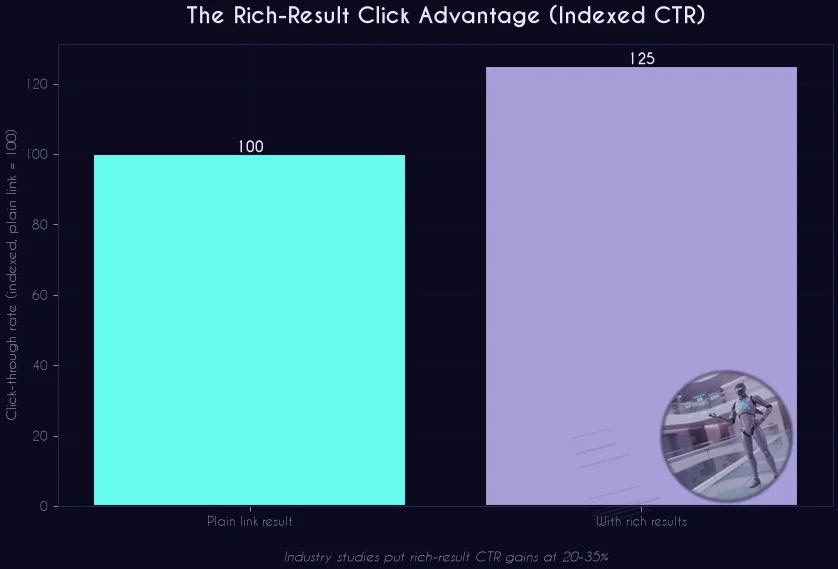
That visual upgrade matters. Industry studies consistently place the click-through rate uplift from rich results in the 20-35% range, and Google's own Search Central documentation confirms structured data is how you become eligible for them. On an AI-era results page, where the plain blue link is shrinking, a listing with stars and details is often the only one that earns the click.
Three numbers explain why this is still a top priority in late 2026:
20-35% — the CTR range industry studies attribute to rich results like review stars, product details, and FAQ dropdowns
46% — share of Google searches that carry local intent (Mobal), where LocalBusiness schema decides whether you surface with details or as a bare link
100% — of the work is one copy-paste block on your site. No redesign, no new content, no recurring cost
Schema even reaches image search: Google's image SEO guidance confirms it uses both structured data and the og:image tag when selecting which picture to show for your brand.
2. Schema in the AI Search Era: Machine-Readable Facts
Through 2026, the bigger reason to care about schema has moved beyond the blue links. Google has repeatedly stated there is no special trick to qualify for AI-powered features, while confirming that the fundamentals, structured data among them, remain essential. Translation: the same machine-readable facts that win rich results are what AI Overviews, AI Mode, and assistants like ChatGPT and Perplexity rely on when they summarize or recommend a business.
An AI model extracting facts at scale prefers statements over prose. A paragraph that says "we are a family dental clinic in Lekki, open Saturdays, emergency appointments available" has to be parsed. A LocalBusiness block that says the exact same thing in labelled fields is simply read. When your Google Business Profile, your website, and your schema all state identical facts, you build the entity consistency that both classic rankings and AI answers reward.
This gap is measurable. Across the roughly 200 anonymized site audits Purple Crib's free AI Visibility Checker has processed as of November 2026, machine-readable "agent readiness" is consistently the weakest scoring area, not content quality. If you have never run that test, it takes two minutes at the AI Visibility Checker, and pairs naturally with the schema fix this article walks you through.
The rule of thumb: every important fact about your business should exist somewhere as labelled data — your GBP profile, your JSON-LD, and your page content — and all three should agree.
3. The 5 Schema Types Every Local Business Needs
You do not need to mark up everything. Start with the five types that cover how local customers actually find, evaluate, and choose you:
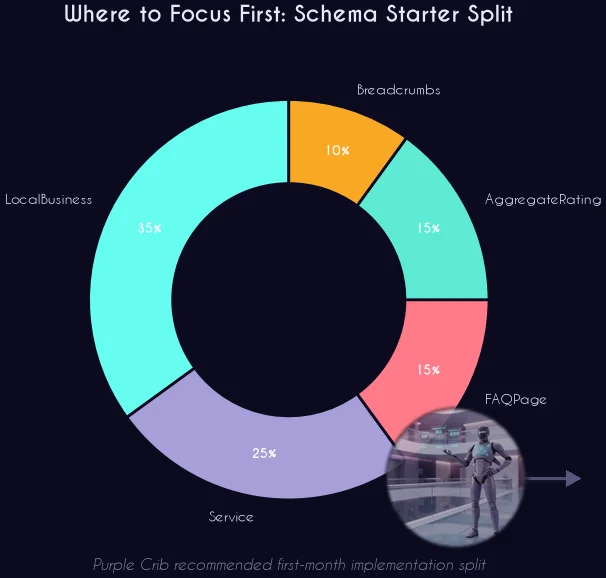
Products and offers come next if you sell online, along with Event schema if you run workshops or webinars. If you also want the keywords those services should target, our free Local Keyword Generator builds 30-plus city-level keyword ideas in one click, a natural companion to this local keyword research playbook.
4. Generate Your JSON-LD in 5 Minutes (Free Tool)
Writing JSON-LD by hand is where most attempts die: one misplaced comma invalidates the whole block, and the error is invisible until Google stops showing your stars. Purple Crib's free Schema Generator removes that step. You fill in your business details once, and it produces a complete, valid JSON-LD block you copy straight into your site.
Step 1 — Enter your identity. Business name, category, one-line description, and website URL, exactly as they appear on your Google Business Profile.
Step 2 — Add your contact facts. Address and phone number. Check them character by character against your GBP listing: the goal is for every surface to agree.
Step 3 — Add social profiles. SameAs links to your Instagram, Facebook, or LinkedIn help engines confirm you are one consistent entity everywhere.
Step 4 — Generate and copy. The Schema Generator outputs your JSON-LD with one click. Copy the whole block.
Step 5 — Paste and test. Drop the block into your site's head or footer (Odoo, WordPress, Wix, and Shopify all have a slot for it), then run it through Google's Rich Results Test and validator.schema.org before you call it done.
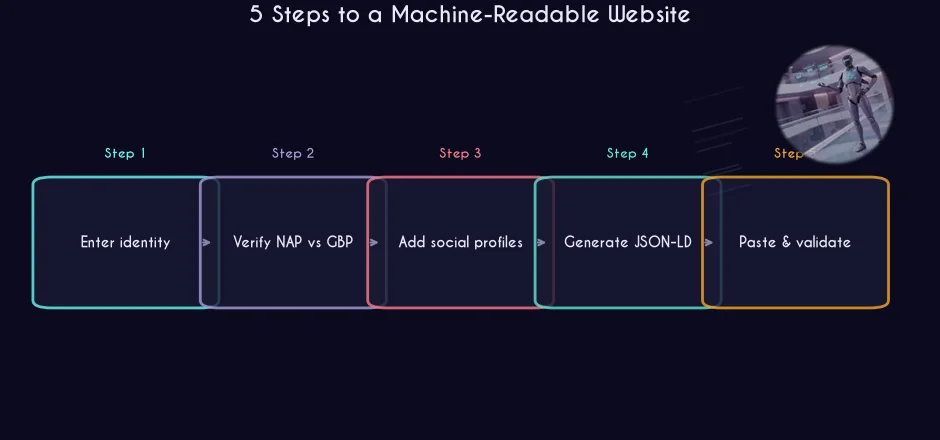
That's the whole job: five fields, one copy, one paste, one test. The generator is the final piece in Purple Crib's six-tool free suite, alongside the GMB Grader, AI Visibility Checker, Review Response Generator, Local Keyword Generator, and WhatsApp Link Generator, all built so small teams can do agency-grade technical work without agency fees. If you have never scored your profile, start with the free GMB Grader audit from our earlier walkthrough.
5. The 5 Most Common Schema Mistakes
Schema is low-effort, which also means it is easy to get subtly wrong. These are the five errors we see most in audits:
❌ Hand-editing the code. Fixing a typo by editing JSON directly usually creates two new typos. Regenerate the block instead, and never leave half an old block alongside the new one — duplicate schema confuses crawlers.
❌ NAP mismatch with your Google Business Profile. "14 Adeola Odeku St" in schema and "14 Adeola Odeku Street" on GBP is a conflicting fact. Pick one canonical format and use it everywhere.
❌ Marking up content that isn't on the page. Schema must describe what visitors can actually see. Hidden or misleading markup violates Google's policies and risks manual penalties.
❌ Self-serving review spam. Stars in search are for genuine, third-party reviews. Fake review markup is one of the fastest ways to lose rich results entirely.
❌ Set-and-forget. Move offices, change hours, add a service, and your schema quietly becomes a lie. Revalidate quarterly at minimum — it takes minutes with the tools in the next section.
6. Your 20-Minute Weekly Schema Routine
Schema is not a project, it's a habit. This is the 20-minute routine we recommend to clients across the US, UK, UAE, Canada, and Nigeria, and it pairs with the Monday profile check from our GBP rules rundown:
1. ✅ Run your homepage and top service page through the Rich Results Test
2. ✅ Fix any "error" items immediately; log "warnings" for the month
3. ✅ Spot-check one fact (hours, phone, address) against your live GBP listing
4. ✅ Add schema markup to one new page that lacks it — one page per week beats a big migration
5. ✅ Confirm your newest service or product appears in structured data somewhere
6. ✅ Note any rich result you saw disappear in search, and trace it back to a code change
7. ✅ Calendar the quarterly full-site revalidation — every page, every block
Do that for a quarter and your site becomes one of the few local businesses whose facts Google and every AI engine can state with confidence.
Schema markup is the quiet, unglamorous work that compounds: every fact you state in machine-readable form makes your listing more clickable in classic search and more quotable in AI answers. The free generator makes the barrier to entry five minutes, which is no longer an excuse to skip it.
🚀 Be the Business AI Can Describe Perfectly
Purple Crib Studios builds schema-rich, AI-readable websites for clients across the US, UK, UAE, Canada, and Nigeria. Free 5-point audit within 48 hours.
💬 Get Your Free Audit on WhatsAppRather Have Experts Handle This?
Purple Crib Studios offers done-for-you local SEO and Google Business Profile optimization, full schema markup included, across the US, UK, UAE, Canada, and Nigeria. Get a free 5-point audit in 48 hours.
Explore Our ServicesFAQs
What is schema markup in simple terms?
Schema markup is a block of JSON-LD code on your website that states your business facts — name, address, services, hours, ratings — in a labelled, machine-readable format from schema.org. Visitors never see it, but Google and AI engines read it to understand and display your business accurately.
Does schema markup directly improve Google rankings?
Schema markup is not a direct ranking factor. Its power is indirect: it makes you eligible for rich results like star ratings and service details, which industry studies show lift click-through rates by roughly 20-35%, and it gives search engines and AI assistants verified facts about your business, which strengthens local and entity relevance.
Is JSON-LD better than microdata or RDFa?
Google recommends JSON-LD. Unlike microdata, which wraps markup around your visible HTML and breaks easily when you edit the page, JSON-LD is one self-contained script block you can paste in one piece. That is also why Purple Crib's free Schema Generator outputs JSON-LD.
How long does it take for rich results to appear after adding schema?
Once Google recrawls the page and the markup passes the Rich Results Test, rich results typically appear within days to a few weeks. You can speed up recrawling by requesting indexing in Google Search Console after publishing your JSON-LD.
Is the Purple Crib Schema Generator really free?
Yes. The Schema Generator at purplecrib.ng/schema-generator is completely free with no signup required. It is one of six free tools in Purple Crib Studios' toolkit, built to help small businesses handle agency-grade technical SEO at zero cost.
Can schema markup help AI chatbots recommend my business?
It helps significantly. AI assistants and AI Overviews extract facts more reliably from structured, labelled data than from prose. When your schema, your Google Business Profile, and your page content all state the same facts consistently, AI engines can quote and recommend your business with confidence.
Test Your Knowledge — Schema Markup Quiz
10 quick questions based on this article. Tap an answer to see if you got it right.
Enjoyed this? One click tells Google to show you more Purple Crib content in Search.
Add on GoogleSources & Further Reading
- Google Search Central — Introduction to Structured Data
- Google Search Central — Review Snippet (Review & AggregateRating) Documentation
- Google Rich Results Test
- Schema Markup Validator (validator.schema.org)
- Schema.org — The Structured Data Vocabulary
- Moz — Schema Structured Data Guide
#SchemaMarkup #StructuredData #JSONLD #SchemaGenerator #LocalSEO #AISEO #RichResults #DigitalMarketing #SEO2026 #MachineReadable #AIVisibility #FreeSEOTools #TechnicalSEO #PurpleCribStudios