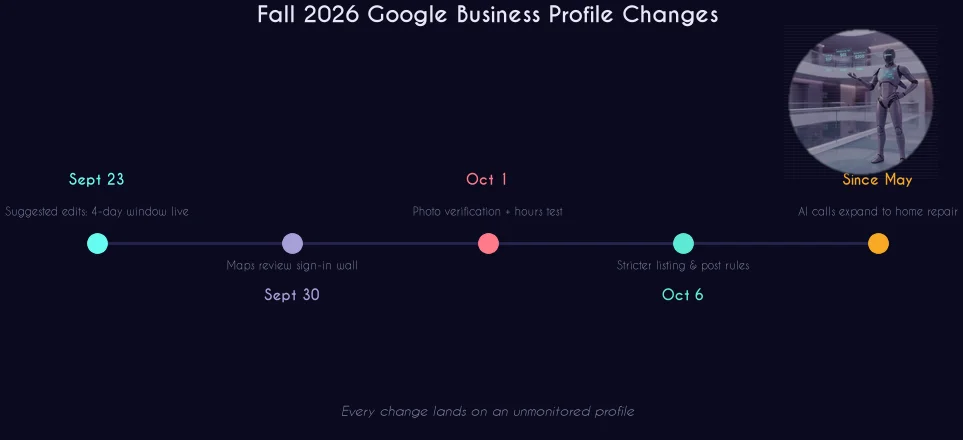
Google quietly tightened the screws on Google Business Profile this fall: suggested edits now publish themselves after four days, Maps hides part of your reviews behind a sign-in, and posts that include phone numbers can break the new content policy. This November 2026 guide from Purple Crib Studios breaks down every change and gives you a weekly routine that keeps your profile safe.
🚀 Your Google Profile Is One Neglected Week From Being Edited
Purple Crib Studios manages Google Business Profiles across the US, UK, UAE, Canada, and Nigeria — weekly monitoring, edit defense, and review systems.
💬 Get a Free Profile Review on WhatsAppTable of Contents
- What Actually Changed This Fall
- The 4-Day Suggested Edits Rule
- The Maps Review Sign-In Wall
- Stricter Rules for Listings and Posts
- Google AI Calls Your Business
- The Ranking Signals That Still Decide Everything
- The Weekly 20-Minute Maintenance Routine
- The Global Playbook: US, UK, UAE, Canada, Nigeria
- Test Your Knowledge — Quiz
- FAQs
1. What Actually Changed This Fall
Between late September and early October 2026, Google shipped a cluster of Google Business Profile changes that all point in one direction: a neglected profile is now a vulnerable profile. None of these changes require an agency to fix. All of them require someone at your business to log in regularly.
2. The 4-Day Suggested Edits Rule
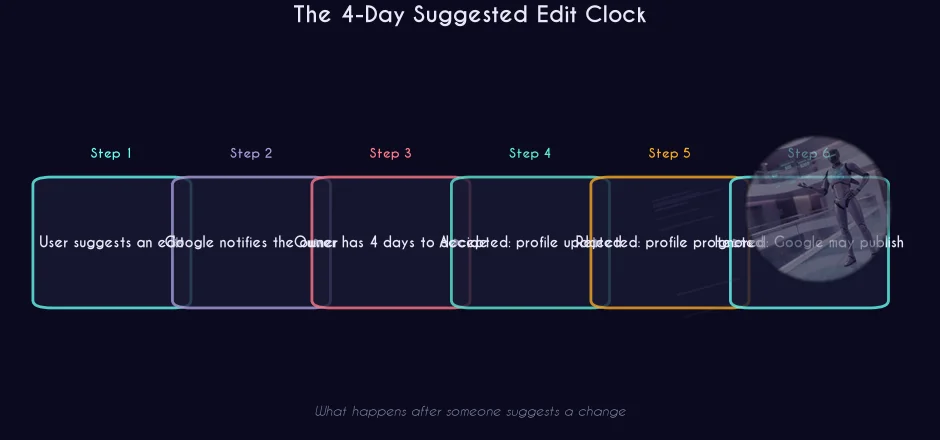
Anyone — a customer, a competitor, a random user — can suggest a change to your business information. What is new is the clock. Google's help page now spells it out: you have four days to accept or reject a suggested edit. Miss the window, and Google may publish the edit if other public information supports it — such as your own website.
Some edits, Google says, may be applied with no prior notice at all.
Here is the part most owners miss: your website is now evidence against you. If your site still lists old hours, a closed location, or a service you dropped months ago, that stale page can be used to support a wrong edit to your profile. Consistency is no longer just an SEO nicety; it is profile defense.
What to do this week:
- Log in and review any pending suggested edits today — the clock may already be running
- Make sure Business Profile notification emails go to an inbox a human reads within a day
- Match your website's hours, address, phone, service area, and services to your profile exactly
- Check the live profile against your records for edits you never saw — some arrive without notice
Our free GMB Grader tool scores your profile across five categories and shows you exactly where these gaps are, in about two minutes.
3. The Maps Review Sign-In Wall
On September 30, Search Engine Roundtable reported that Maps now requires a Google account sign-in to see all reviews, sort them, leave a review, and see all photos. Google has not explained the scope or the regions affected. The prompt reads: "Read and search through every review and photo."
For a business owner, the practical effect is simple: a visitor who is not signed in sees only part of your review history and cannot sort it. That means the reviews that surface without a sign-in likely carry more weight than they used to.
Your best defense did not change: a steady flow of recent, detailed reviews from real customers, with owner responses. A wall of five-star ratings from three years ago says less to Google — and to buyers — than twenty fresh reviews describing actual experiences.
It is also now a reason to show proof on your own website. A page with real customer feedback, project photos, and clear details about your work does not depend on whether a visitor is signed in to Google. If you get negative or mixed reviews, our free review response generator drafts professional replies in seconds.
4. Stricter Rules for Listings and Posts
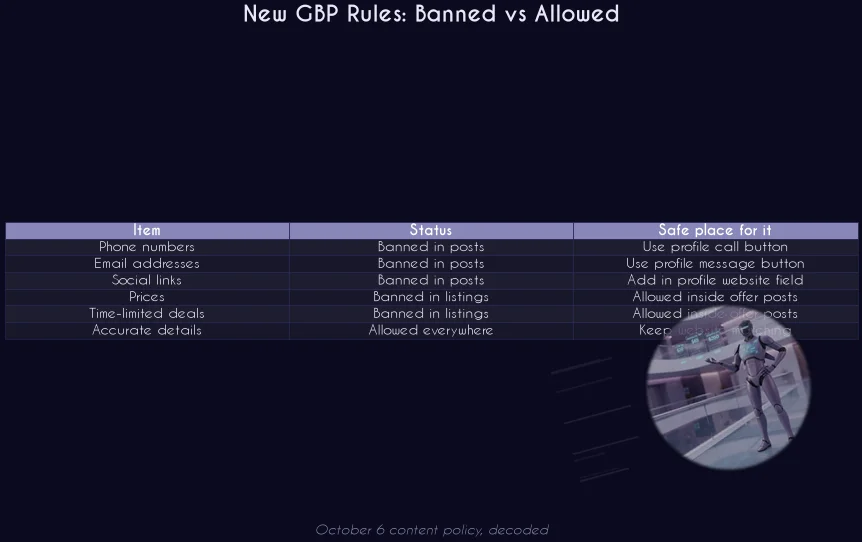
On October 6, Google updated the Maps and Business Profile content policy. The rules split into two parts, and both can catch a business that was doing everything "the old way".
If your posts end with "Call us at (your number) for a free estimate," or your business description mentions a "special, 20% off," that text can now break policy. The fix is mechanical:
- Remove phone numbers and emails from all Google Posts
- Take deals and prices out of listing fields (description, services)
- Keep offers inside posts where they are still allowed
- Use the profile's own buttons — call, message, book — for contact, not the post text
This is the same direction we covered in October's AI Overviews and the local pack: Google keeps moving the goalposts for what a "clean" profile looks like, and keeps rewarding businesses that update weekly instead of yearly.
5. Google AI Calls Your Business
At Google I/O in May, Google announced that its AI calling feature would expand to home repair, with a roofer as the example. The feature calls local businesses that appear in local results, asks about pricing and availability, and gives the customer a summary — usually within about 30 minutes, per JobNimbus's documentation. It first covered auto shops and nail salons, with a US rollout promised for summer 2026.
Think about what that call actually is: a customer asking about price and availability through an assistant. If whoever answers your phone can give a clear starting price range and the next open appointment, you come across well in that summary. If calls go to voicemail, you probably do not — and the customer gets a summary that says so.
Businesses can opt out through Business Profile settings. Before you opt out, consider that this is an early signal of the agent-driven economy: assistants are not just reading your profile, they are picking up the phone. The businesses that answer well get recommended. We covered this shift in depth in AI Turns Profitable: November 2026's Trends and the Agent Economy.
What to do this week: write a short phone script with a starting price range and how soon you can schedule. Make sure someone picks up during your listed hours.
6. The Ranking Signals That Still Decide Everything
The policy changes matter, but the fundamentals underneath them did not move. The 2026 Local Search Ranking Factors survey (Whitespark, Nov 2025) is still the best map of what Google actually rewards:
- Hours accuracy: Darren Shaw, founder of Whitespark, puts it plainly — "Google wants to show people businesses that are open." Set your own hours, including holidays, so Google has less reason to guess.
- Predefined Services: Joy Hawkins's research found that the Services Google suggests on your profile affect rankings — the factor rose to #22 for the local pack/Maps. Accept the relevant suggested services instead of ignoring them.
- Primary category precision: the most specific primary category beats the broadest one, every time.
- Review velocity and response: steady, recent reviews with owner responses signal an active business. A static count from 2023 signals the opposite.
- NAP consistency: the same name, address, and phone across your profile, website, and citations.
Our full Google Business Profile Optimization 2026 global playbook walks through each lever in detail.
7. The Weekly 20-Minute Maintenance Routine
Every change above is survivable with one habit: a real check every week. Four days is short — a monthly check can miss the window entirely. Here is the routine we run for managed profiles:
- Monday, 5 minutes: Log in. Review pending suggested edits. Accept or reject every one — never leave any sitting.
- Monday, 3 minutes: Read new reviews. Respond to each one. Report obvious fakes rather than letting them pile up.
- Monday, 3 minutes: Check hours for the week ahead, including holidays. Google is testing automatic hours; your explicit settings should win.
- Wednesday, 4 minutes: Publish one post — an update or a promotional offer (inside the post, where offers are still allowed). No phone numbers, no emails, no social links in the text.
- Wednesday, 3 minutes: Add 2-3 fresh, real photos. Have a clear photo of signage, vehicle, or storefront ready in case of photo verification.
- Friday, 2 minutes: Compare the live profile against your website. Hours, address, phone, services, service area — everything should agree everywhere.
Twenty minutes a week. That is the entire difference between a profile that defends itself and a profile that gets edited by strangers.
8. The Global Playbook: US, UK, UAE, Canada, Nigeria
Purple Crib Studios manages profiles across five markets, and the fall 2026 changes land differently in each:
- United States: The AI calling rollout started here. Home services and trades need a phone script now, not next quarter. Read more on our GMB optimization services page.
- United Kingdom: The sign-in wall and stricter post rules apply globally. UK businesses with long-standing review histories should prioritize fresh reviews this quarter.
- UAE: Multi-branch businesses should verify each location separately — duplicate and unverified listings split ranking signals and are the biggest gap we see. Our UAE GMB services page covers the details.
- Canada: English and French listings need consistent NAP across both. See our Canada GMB services page.
- Nigeria: WhatsApp-first customers convert from the profile's WhatsApp button — make sure it works, and that someone answers. Our Lagos local SEO agency page covers the local stack.
Wherever you operate, the principle is identical: Google now treats your profile like a storefront it inspects weekly. Treat it the same way.
The November 2026 GMB Checklist
Pin this section. Every item is a quick win:
- ✅ Review and clear all pending suggested edits today
- ✅ Confirm profile notification emails reach a human inbox, checked daily
- ✅ Remove phone numbers and emails from every Google Post
- ✅ Remove deals, prices, and CTAs from listing fields (description, services)
- ✅ Match website hours, address, phone, and services to the profile exactly
- ✅ Write the phone script: starting price range, next open appointment
- ✅ Set your own hours, including holidays, before Google's automatic-hours test fills gaps
- ✅ Prepare a signage/storefront photo for photo verification requests
- ✅ Launch or refresh a review request flow — recent, detailed reviews are the new wall
- ✅ Schedule the weekly 20-minute routine in your calendar, with an owner's name on it
The businesses that win their local pack in 2027 are not the ones with the biggest budgets. They are the ones that never let a suggested edit sit for four days. Start this week, keep it weekly, and the map pack takes care of itself.
🚀 Four Days Is Shorter Than You Think
Let Purple Crib Studios monitor, defend, and grow your Google Business Profile across the US, UK, UAE, Canada, and Nigeria.
💬 Talk to Us on WhatsAppRather Have Experts Handle This?
Purple Crib Studios offers done-for-you Google Business Profile Optimization across the US, UK, UAE, Canada, and Nigeria. Get a free 5-point audit in 48 hours.
Explore Our ServicesFAQs
What happens if I miss the 4-day window for a suggested edit?
Google may publish the edit after four days if other public information supports it, such as your own website. Some edits may be applied with no notice at all. Check your profile regularly and keep your website's hours, address, and services matching your profile.
Can I still put my phone number in Google Posts?
Not under the updated Maps and Business Profile content policy reported October 6, 2026. Posts may not include email addresses, phone numbers, social links, or unrelated links. Contact details belong in the profile's own call, message, and booking buttons.
Why does Google Maps ask people to sign in to read reviews?
Google has not explained it. Since September 30, 2026, Maps requires a signed-in Google account to see all reviews, sort them, leave a review, and see all photos. Visitors who are not signed in see only part of your review history, so recent, detailed reviews from real customers carry more weight than before.
Is Google AI really calling local businesses?
Google announced the expansion at I/O in May 2026, starting with auto shops and nail salons and expanding to home repair with roofers as the example. The AI calls businesses that appear in local results, asks about pricing and availability, and gives the customer a summary within about 30 minutes. Businesses can opt out through Business Profile settings, but answering well is usually the better move.
Do the suggested Google Services on my profile really affect rankings?
Yes. Joy Hawkins's research, cited in Whitespark's Local Search Ranking Factors survey, found that the predefined Services Google suggests on a Business Profile affect rankings — the factor rose to #22 for the local pack and Maps. Accept the relevant suggested services rather than ignoring them.
How often should I actually log into my Google Business Profile?
Twice a week is the safe minimum in 2026. The 4-day suggested edit window means a weekly check can miss it entirely, and some edits arrive with no notice. Purple Crib Studios' managed routine is 20 minutes: Monday for edits, reviews, and hours; Wednesday for a post and photos; Friday for a website consistency check.
Are these changes the same in the UK, UAE, Canada, and Nigeria?
The content policy and suggested edits rules are global. The Maps review sign-in wall has no confirmed regional scope yet, and the AI calling rollout is US-first. The weekly maintenance routine protects you in every market.
Test Your Knowledge — Google Business Profile Fall 2026 Quiz
10 quick questions based on this article. Tap an answer to see if you got it right.
Enjoyed this? One click tells Google to show you more Purple Crib content in Search.
Add on GoogleSources & Further Reading
- Google Business Profile Changes: 4-Day Edits, Review Sign-In, New Rules — MarketPros
- Google Business Profile Help Center
- Search Engine Roundtable — original reporting on suggested edits and the Maps sign-in wall
- Whitespark — Local Search Ranking Factors survey
- JobNimbus — documentation on Google AI call summaries for home services
- Google Business Profile Suggested Edits: 4 Days to Reject — Aimee
Hashtags: #GoogleBusinessProfile #GBPUpdates #LocalSEO #GMB2026 #GoogleMaps #LocalSearchRankingFactors #ReviewManagement #AIBusinessCalls #SuggestedEdits #LocalPack #MapPack #DigitalMarketing #PurpleCribStudios #LocalMarketing #SmallBusinessSEO