Passport photos are the single most rejected part of any visa or passport application worldwide, and the rules quietly changed again in 2026 as more embassies move to automated facial matching. The good news: the size, head height, eye line, background, exposure, sharpness, and print resolution every country checks are knowable in advance, and Purple Crib Studios just shipped a free tool that measures all of them for you before you spend a naira, dollar, dirham, or pound at a photo shop.
🚀 Stop Guessing If Your Photo Will Pass
Upload your photo, pick your country, and our free tool tells you pass or fail in seconds — no sign-up, no upload to any server.
💬 Try It Free on WhatsAppTable of Contents
- Why Passport Photos Get Rejected More Than Anything Else
- Passport Photo Sizes by Country (2026)
- The 7 Rules Embassies Actually Check
- Meet the Free Purple Crib Passport Photo Tool
- From Selfie to Embassy-Ready in 5 Minutes
- The Compliance Check: How the Pass/Fail Verdict Works
- Printing and Submitting: What Photo Shops Need
- The 10-Point Pre-Submission Checklist
- FAQs
- Test Your Knowledge — Quiz
1. Why Passport Photos Get Rejected More Than Anything Else
Embassies and immigration offices reject passport photos for reasons that have nothing to do with how good the photo looks to a human. Modern systems scan the face, measure the head height, locate the eyes, and check the background automatically. A photo that looks fine to you can fail a machine in milliseconds because the head is two millimetres too low, the background has a faint shadow, or the resolution is too soft to print sharply.
The most common rejection reasons are remarkably consistent across countries: wrong size or aspect ratio, head too large or too small, eyes not on the required line, a non-plain or dark background, shadows on the face or background, glare on glasses, a non-neutral expression, and a photo that is too low-resolution to scan cleanly. None of these are subjective. Every one of them is a number a tool can measure.
That is exactly the gap our free Passport Photo Tool closes. Instead of paying a studio, waiting, and hoping, you upload your photo, pick your country, and the tool measures each rule against that country's official requirement before you print.
2. Passport Photo Sizes by Country (2026)
Sizes are not interchangeable. A Nigerian international passport photo is 35×45 mm, a United States passport or visa photo is 2×2 inches (51×51 mm), and a Canadian passport photo is 50×70 mm. Submit the wrong size and your application is returned before anyone looks at the face. Here are the official dimensions, head-height ranges, eye-line positions, and background rules for the countries our tool supports.
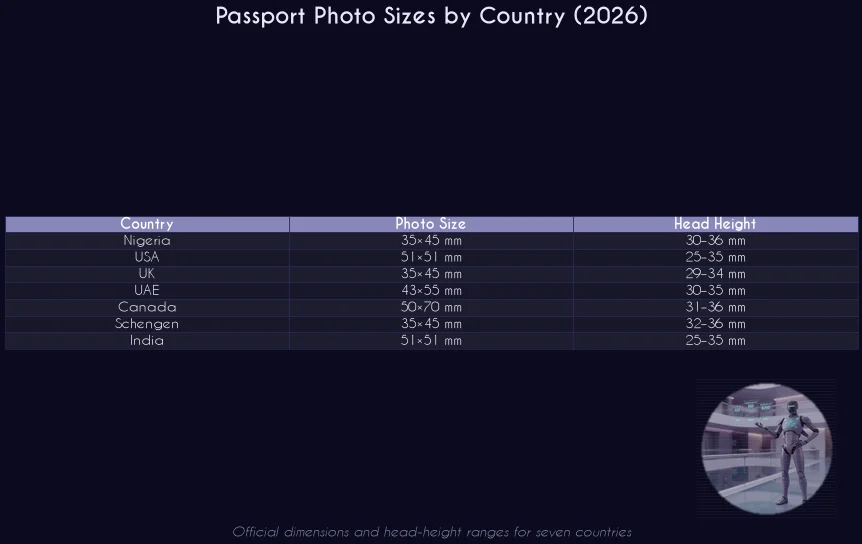
These are the same numbers our free passport photo tool uses internally, so when you select a country the crop frame, head guide, and eye line all snap to that country's exact specification. For a deeper look at how local trust signals feed into broader visibility, see our Google Business Profile global playbook.
3. The 7 Rules Embassies Actually Check
Whatever the country, the machine-readable checks boil down to seven measurable rules. Get all seven right and your photo is in the green.
1. Correct size and aspect ratio. The printed photo must match the official millimetre dimensions exactly. A 35×45 mm photo is not the same as a 2×2 inch photo, and embassies measure.
2. Head height within range. The distance from the crown of the head to the tip of the chin must fall inside the country's allowed band, usually expressed in millimetres. Too big or too small and the face matcher fails.
3. Eyes on the eye line. Most countries fix the distance from the bottom of the photo to the eyes. The tool draws the eye line for you; aligning to it is what makes the difference.
4. Face centred horizontally. The face must sit on the vertical centre of the photo, not leaning left or right.
5. Plain, light background. A white or off-white background with no shadows, patterns, or other people. Dark or busy backgrounds are the fastest way to a rejection.
6. Good exposure and sharpness. The face must be evenly lit, not too dark or too bright, and sharp enough to scan. Soft or blurry photos fail the biometric capture.
7. Print resolution of 300 DPI. The exported file must hold enough pixels to print cleanly at the official size. A photo that looks fine on a phone but is only 150 DPI will print soft and can be rejected at the counter.
4. Meet the Free Purple Crib Passport Photo Tool
The Purple Crib Passport Photo Tool is a free, browser-based application built to do all seven checks for you. It runs entirely in your browser using HTML5 Canvas and JavaScript, which means your photo is never uploaded to any server, never stored, and never seen by anyone but you. There is no registration, no watermark, and no usage limit.
What it does, feature by feature:
✅ Country presets with official specs. Nigeria, USA, UK, UAE, Canada, Schengen, and India, each loaded with the exact size, head-height range, and eye-line position from that country's published requirements.
✅ Guided crop. A crop frame locked to the correct aspect ratio, with a dashed head guide and an eye line so you can align by eye in seconds.
✅ Adjustments. Brightness, contrast, and saturation sliders to rescue a slightly dark or flat photo before you export.
✅ Embassy compliance check. A one-tap check that measures face position, head height, eye line, centering, background, exposure, sharpness, and print resolution, then returns a clear PASSED, ALMOST, or FAILED verdict with the exact reasons.
✅ 300 DPI export. Download the final photo as a JPEG or PNG at the exact official dimensions and 300 DPI, the resolution immigration offices require.
✅ Print sheets. Generate a 4×6 inch or A4 sheet that fits as many copies of your photo as possible with dashed cutting guides, and export it as JPEG or PDF for any photo shop.
✅ Private by design. Everything happens on your device. No account, no upload, no tracking of your image.
If you have used our other free resources, the same thinking applies: useful, no-friction tools that earn trust. See how we approach discovery and reach for modern audiences for the wider strategy.
5. From Selfie to Embassy-Ready in 5 Minutes
The whole workflow takes about five minutes from upload to print sheet.
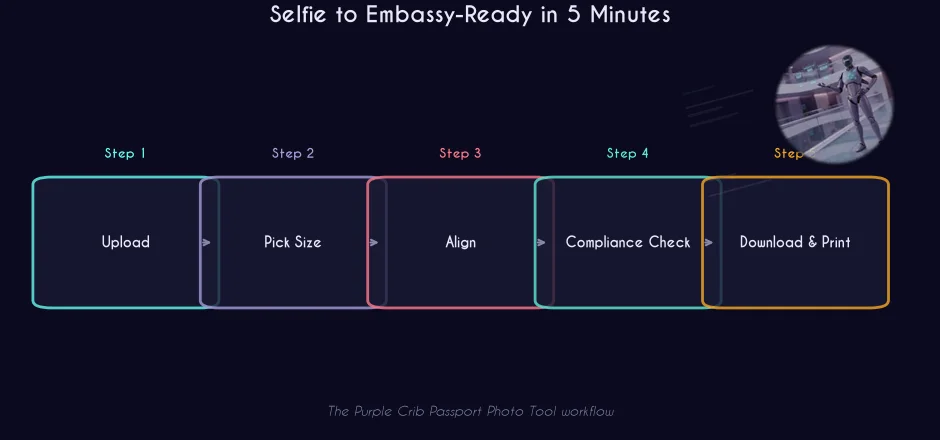
1. Upload. Open the tool, tap or drop your photo. A front-facing shot taken against a plain wall in daylight works best.
2. Pick your country. Choose the document you are applying for. The crop frame, head guide, and eye line update to that country's spec instantly.
3. Align. Drag to move, pinch or scroll to zoom, until the head fills the dashed guide and the eyes sit on the eye line.
4. Run the compliance check. Tap "Will my photo pass?" and read the verdict. Fix anything flagged, then re-check.
5. Download and print. Save the 300 DPI photo, or generate a 4×6 or A4 print sheet with cut guides and take it to any photo shop.
6. The Compliance Check: How the Pass/Fail Verdict Works
The compliance check is the heart of the tool. When you tap the button, it runs a series of measurements directly in your browser and returns a colour-coded verdict.
The verdict is simple. A green PASSED means every checked rule is satisfied. An amber ALMOST means there are warnings to fix for the best chance of acceptance. A red FAILED lists the exact issues to correct. Fix them, re-run the check, and download when it passes.
7. Printing and Submitting: What Photo Shops Need
Most embassies still want a physical print, and photo shops print from a sheet, not a single small file. The tool's print sheet feature solves this: it arranges as many copies of your 300 DPI photo as will fit on a 4×6 inch or A4 sheet, adds dashed cutting guides, and lets you download it as a JPEG or PDF. Hand that file to any photo shop, or print it at home on glossy photo paper, and cut along the guides.
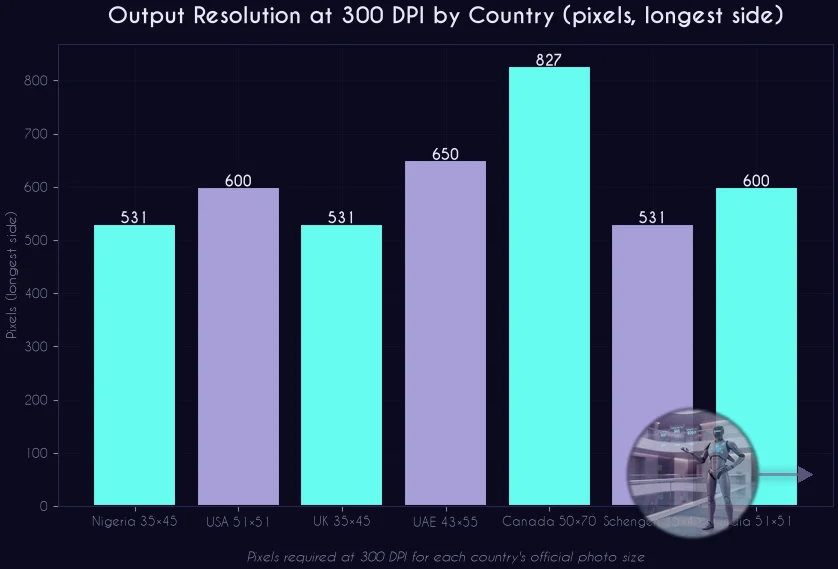
Two practical tips. First, always export at 300 DPI; a lower resolution will look fine on screen but print soft. Second, print on plain white glossy photo paper, not matte, because matte textures can interfere with biometric scanning. If your photo failed the compliance check and you need a guaranteed result, our team can retouch and verify photos for any embassy.
8. The 10-Point Pre-Submission Checklist
Run this before you submit. It mirrors exactly what the tool checks.
✅ 1. Photo size matches the official dimensions for your country
✅ 2. Head height is inside the allowed millimetre range
✅ 3. Eyes sit on the required eye line
✅ 4. Face is centred horizontally in the frame
✅ 5. Background is plain white or off-white with no shadows
✅ 6. Face is evenly lit, not too dark or too bright
✅ 7. Photo is sharp enough to scan cleanly
✅ 8. Export is 300 DPI at the official size
✅ 9. Print sheet has cut guides and the correct number of copies
✅ 10. You ran the compliance check and it returned PASSED
Want this done for you? The same team that built the tool offers done-for-you digital marketing and free-tool marketing for brands across the US, UK, UAE, Canada, and Nigeria.
🌍 One Photo, Every Embassy
Check your passport photo against official rules for seven countries in seconds — free, no sign-up.
💬 Open the Free ToolRather Have Experts Handle This?
Purple Crib Studios builds free tools and done-for-you digital marketing across the US, UK, UAE, Canada, and Nigeria. Get a free 5-point audit in 48 hours.
Explore Our Services💬 Free tool: Turn your WhatsApp number into a click-to-chat link and QR code with our free WhatsApp Link Generator.
FAQs
Is the Purple Crib passport photo tool really free?
Yes. The tool is completely free, with no registration, no watermark, and no usage limits. It is a free resource from Purple Crib Studios to help travellers and applicants worldwide prepare embassy-ready photos.
Does my photo get uploaded to a server?
No. All cropping, compliance checks, and print-sheet generation run inside your own browser using HTML5 Canvas and JavaScript. Your photo is never sent to, or stored on, any server.
Which countries does the tool support?
Nigeria, the United States, the United Kingdom, the UAE, Canada, Schengen Europe, and India, each with its official photo size, head-height range, eye-line position, and background rule.
Will the compliance check guarantee my photo is accepted?
The check measures the objective rules embassies use — size, head height, eye line, centering, background, exposure, sharpness, and print resolution — and gives you a clear pass or fail with the reasons. Final acceptance is always decided by the issuing embassy, but passing the check gives you the best possible chance.
What resolution do the downloaded photos have?
Every photo is exported at 300 DPI at the exact official dimensions of the country you select, which is the resolution immigration and passport offices require. The compliance check also warns you if your source photo is too small to print sharply.
What if my photo fails the check?
The verdict lists the exact issues to fix. Adjust the crop, lighting, or background, then re-run the check. If you need a guaranteed result, Purple Crib Studios offers professional retouching and verification for any embassy.
Can I print the photos at home?
Yes. The tool generates a 4×6 inch or A4 print sheet with as many copies of your photo as fit, complete with dashed cutting guides, and exports it as JPEG or PDF. Print it on white glossy photo paper at home or hand the file to any photo shop.
Test Your Knowledge — Passport Photo Sizes Quiz
10 quick questions based on this article. Tap an answer to see if you got it right.
Enjoyed this? One click tells Google to show you more Purple Crib content in Search.
Add on GoogleSources & Further Reading
- US Department of State — Passport Photo Requirements
- UK Government — Passport Photos
- Government of Canada — Passport Photo Requirements
- ICAO Doc 9303 — Machine Readable Travel Documents (Facial Image Standards)
- Nigeria Immigration Service
- European Commission — Schengen Visa Code
#PassportPhoto #PassportPhotoSizes #VisaPhoto #PassportPhotoTool #FreeTools #TravelDocuments #Immigration #PassportPhotoChecker #DigitalMarketing #PurpleCribStudios #TravelTips #PhotoRequirements