
Table of Contents
- The Shift From Scraping to Tools
- Why E‑commerce Search Is the Perfect First WebMCP Tool
- Imperative WebMCP in Action: searchProducts Code Example
- Mapping WebMCP Tools to Your Existing Stack
- Agent‑Ready SEO: From Keywords to Executable Actions
- Connections: How This Fits into Your Broader SEO & AI Strategy
1. The Shift From Scraping to Tools
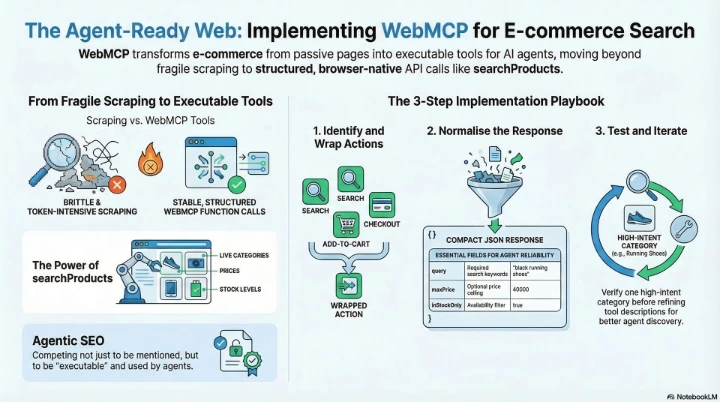
In part one, we saw how WebMCP turns websites into structured tools that AI agents can call directly instead of scraping HTML, CSS, and screenshots. Instead of "guessing" which button is checkout, agents get a clear list of actions like searchProducts, bookAppointment, or checkout exposed via a browser‑native API.
This second part goes hands‑on. We'll build an imperative WebMCP tool for e‑commerce search, then connect it back to SEO, local visibility, and the "agent‑ready" future of the web.
2. Why E‑commerce Search Is the Perfect First WebMCP Tool
For most online stores, search is one of the highest‑intent entry points. When a human types into your search bar, they're telling you exactly what they want. When an AI agent is shopping on a user's behalf, the same logic applies.
If an agent can call a searchProducts tool directly, it can:
- Query your full catalogue without trying to reverse‑engineer your UI.
- Apply filters (category, price range, in‑stock only) in a predictable way.
- Return product URLs that go straight into your purchase funnel.
That makes e‑commerce search the ideal "first tool" to implement with the WebMCP imperative API.
3. Imperative WebMCP in Action: searchProducts Code Example
The imperative WebMCP API lets you register tools in JavaScript. You define:
- A name and description,
- An input schema (JSON Schema),
- An execute callback that runs your existing business logic.
Here's a concrete searchProducts example:
if ("modelContext" in navigator) {
  navigator.modelContext.registerTool({
    name: "searchProducts",
    description:
      "Search the product catalog by keyword, with optional filters for category, price range, and stock availability. Returns a list of matching products with name, price, image URL, and product ID.",
    inputSchema: {
      type: "object",
      properties: {
        query: {
          type: "string",
          description: "Search keywords describing the product",
        },
        category: {
          type: "string",
          description: "Optional category slug or ID to filter by",
        },
        minPrice: {
          type: "number",
          description: "Minimum price in your store currency",
        },
        maxPrice: {
          type: "number",
          description: "Maximum price in your store currency",
        },
        inStockOnly: {
          type: "boolean",
          description: "If true, only return products currently in stock",
        },
      },
      required: ["query"],
    },

    // Imperative execute callback: wire this to your real search logic
    execute: async (input, client) => {
      const { query, category, minPrice, maxPrice, inStockOnly } = input;

      // Example: call your existing search API
      const params = new URLSearchParams({
        q: query,
        ...(category ? { category } : {}),
        ...(minPrice != null ? { min_price: String(minPrice) } : {}),
        ...(maxPrice != null ? { max_price: String(maxPrice) } : {}),
        ...(inStockOnly ? { in_stock_only: "true" } : {}),
      });

      const res = await fetch(`/api/products/search?${params.toString()}`);
      if (!res.ok) {
        return {
          content: [
            {
              type: "text",
              text: JSON.stringify({
                success: false,
                error: `Search failed with status ${res.status}`,
              }),
            },
          ],
        };
      }

      const products = await res.json();

      const results = products.map((p) => ({
        id: p.id,
        name: p.name,
        price: p.price,
        currency: p.currency || "NGN",
        imageUrl: p.imageUrl,
        url: `/shop/product/${p.slug || p.id}`,
        inStock: p.inStock,
      }));

      return {
        content: [
          {
            type: "text",
            text: JSON.stringify({
              success: true,
              total: results.length,
              results,
            }),
          },
        ],
      };
    },
  });
}
This doesn't replace your existing search logic. It simply wraps it in a tool contract that AI agents can reliably call.
4. Mapping WebMCP Tools to Your Existing Stack
You can wire this pattern into almost any e‑commerce platform:
-
Odoo / Odoo.sh
Point fetch at your Odoo search route and map fields like id, name, list_price, image, and website URL into the results array. -
WooCommerce
Call the REST API (/wp-json/wc/v3/products) with search, category, and price filters, then normalise the product object into the minimal tool response. -
Custom Node / Laravel / Django
Connect the tool to your existing search controller and ensure the response is consistent and compact.
The rule of thumb: keep the tool interface stable even if your backend evolves. Agents should be able to rely on the same input/output shape for a long time.
5. Agent‑Ready SEO: From Keywords to Executable Actions
Classic SEO optimises pages so they rank and get clicked. WebMCP adds a new layer: optimising actions so they are discoverable and usable by AI agents.
- Tool naming – use clear, action‑oriented names: searchProducts, not doQuery.
- Descriptions as "meta for agents" – write them like a perfect long‑tail meta description.
- Schemas as intent filters – inputs like category, minPrice, maxPrice, and inStockOnly tell agents exactly when your tool is relevant.
6. Connections: How This Fits into Your Broader SEO & AI Strategy
- Link up to your original post on "Beyond Scraping: How WebMCP Turns Websites into Structured AI Tools" for the conceptual overview.
- Link sideways to 2026 SEO trend articles and your guides on local SEO in Nigeria.
- Link down to more technical pieces on declarative WebMCP tools.
#WebMCP #AIAgents #AgenticWeb #TechnicalSEO #EcommerceSEO #SEONigeria #LocalSEONigeria #OdooNigeria #DeveloperExperience #BrowserAPIs #AIForBusiness #DigitalMarketingNigeria